

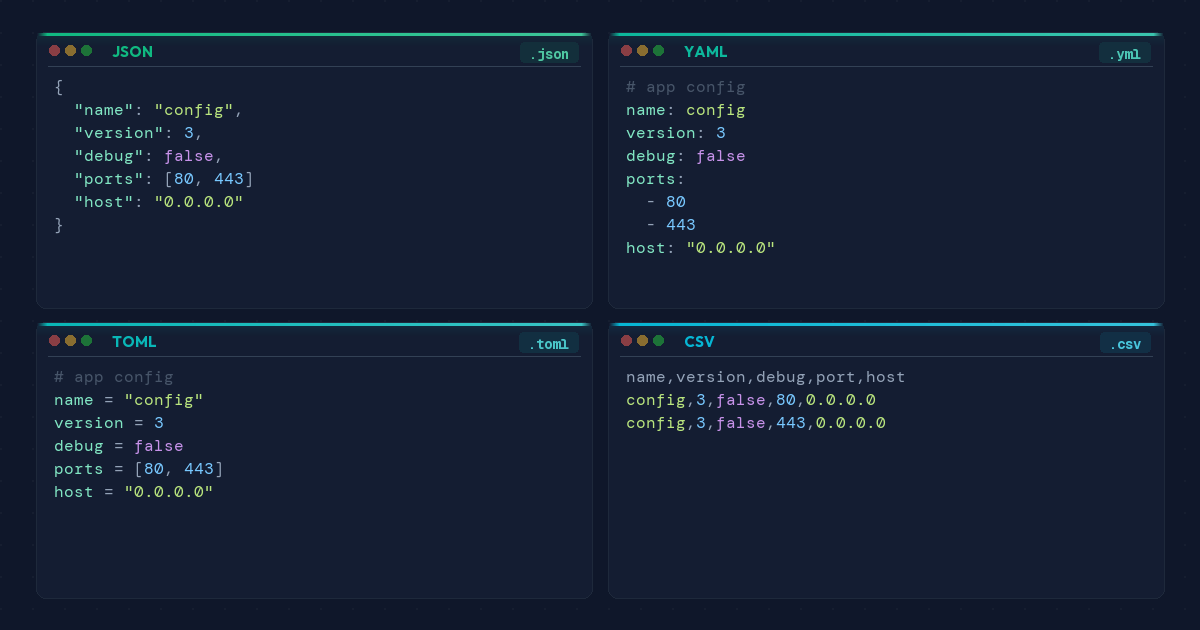
Choosing the right data format is a decision every developer faces daily. JSON, YAML, TOML, and CSV each have clear strengths — and clear limits. This guide compares all four and tells you when to use each one.
Quick Comparison
| Feature | JSON | YAML | TOML | CSV |
|---|---|---|---|---|
| Human readability | Moderate | High | High | High |
| Comments | No | Yes | Yes | No |
| Data types | Strings, numbers, booleans, arrays, objects | All JSON types + dates | All JSON types + native dates | Strings only |
| Best for | APIs, data interchange | CI/CD config, DevOps | Package config, app settings | Tabular data export |
| Learning curve | Low | Medium | Low | Very low |
JSON: The Universal Interchange Format
JSON is the default language of the web. Every major programming language has a built-in parser. Every REST API speaks it. Every browser understands it natively.
The trade-offs show up in configuration. No comments means you cannot document decisions. No native date type means timestamps become strings. For APIs, JSON is the right choice. For config files, consider YAML or TOML. Clean up messy output with SnipKit's JSON Formatter or validate syntax with the JSON Validator.
YAML: Human-Readable Configuration
YAML dominates CI/CD pipelines, Docker Compose, and Kubernetes manifests. Comments and multiline strings make it ideal for files humans maintain.
The downsides are real. Indentation errors cause silent failures. The full spec is complex, and certain parsers have had security vulnerabilities. Convert between formats instantly with the JSON to YAML Converter.
TOML: Explicit and Minimal
TOML fixes YAML's ambiguity problem. The spec is small, parsing is unambiguous, and dates are native types. Rust's Cargo.toml and Python's pyproject.toml both chose TOML for good reason.
The weakness is deep nesting — multi-level hierarchies get awkward. Use the TOML to JSON Converter to move between formats.
CSV: Tabular Data, Nothing More
CSV does one thing well: rows and columns. Every spreadsheet opens CSV files without setup. File sizes stay tiny with zero schema overhead.
No nested data, no types, no comments. Use CSV for genuinely tabular data. The JSON to CSV Converter flattens JSON arrays into spreadsheet-ready rows.
When to Use Which Format
- API communication — JSON. Universal support, fast parsing.
- CI/CD and infrastructure config — YAML. Readable, commentable.
- Package or app configuration — TOML. Explicit, no ambiguity.
- Data export and spreadsheets — CSV. Maximum compatibility.
Unsure? If humans edit the file directly, use YAML or TOML. If machines generate and consume it, use JSON.
FAQ
Is YAML faster than JSON?
JSON parses faster because its grammar is simpler. YAML wins on readability and authoring speed. For machine-to-machine exchange, choose JSON. For human-edited files, YAML is worth the trade-off.
Can I use JSON for configuration files?
Yes, but JSON has no comment syntax. You cannot document why a value is set. YAML and TOML both support comments, making them better for long-lived config.
What is replacing JSON in 2026?
Nothing replaces JSON for APIs. TOML is gaining ground for config in Rust and Python. YAML stays dominant in DevOps. Each format holds its lane.
No format wins everywhere. JSON dominates APIs, YAML owns DevOps, TOML handles packages, and CSV stays unbeatable for tabular exports. SnipKit's free tools handle conversions between them.